


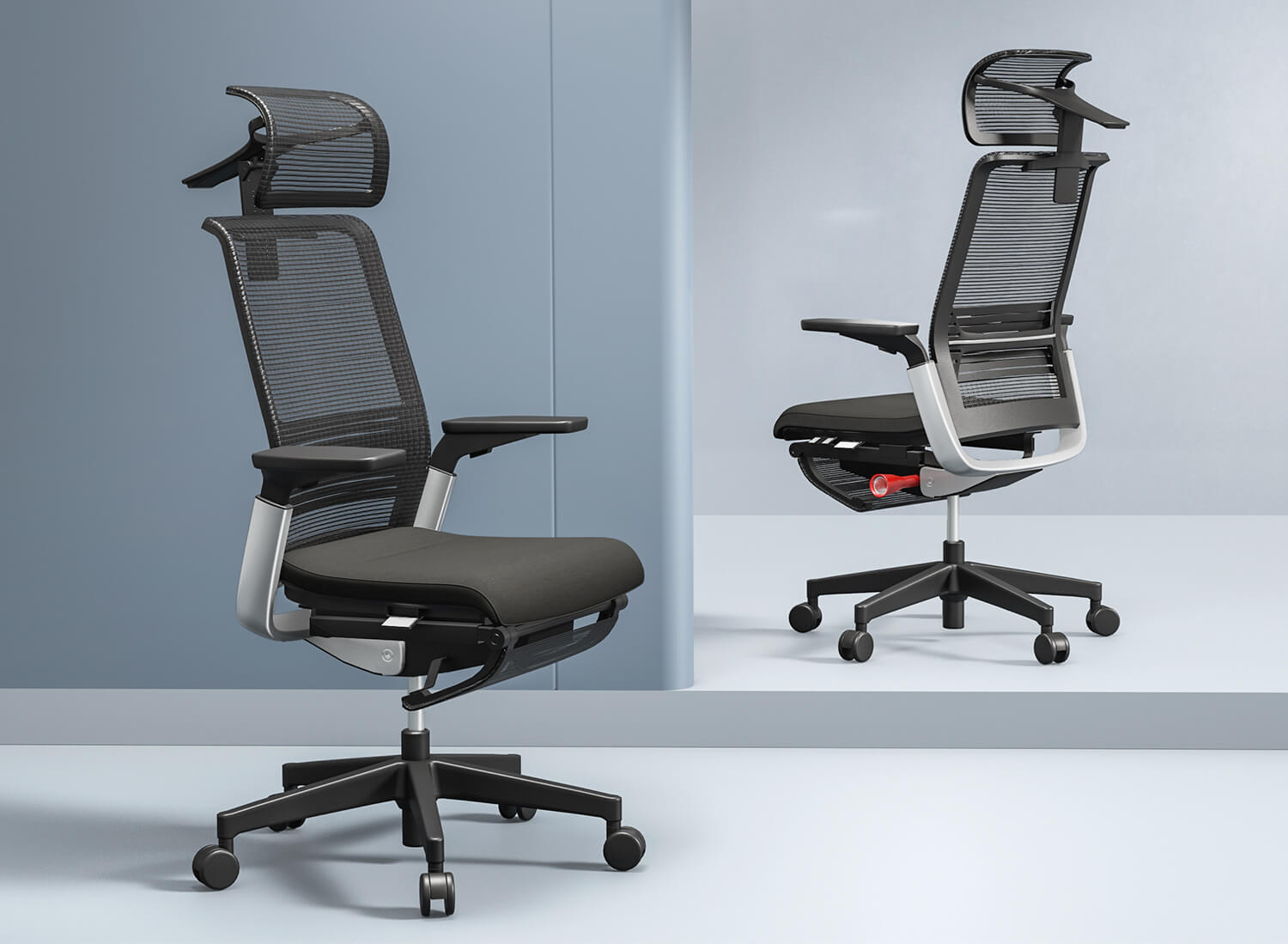
An office chair should have many ergonomic features. These features help people stay comfortable and healthy at work. You should look for adjustability, lumbar support, seat height, armrests, tilt, good material, and a strong base. These things stop pain, help you focus, and keep your posture good. Research shows ergonomic furniture can help you do better at your job and feel less pain at work. SpaceUnited makes products that help people work well and feel good every day.
Key Takeaways
Pick an office chair with seat height you can change. Make sure you can adjust the seat depth too. This helps you feel comfortable and keeps blood moving well.
Find lumbar support that you can move to fit your lower back. This support helps stop pain and makes your posture better.
Choose chairs with armrests you can adjust. These armrests help your arms and shoulders. They stop your muscles from getting sore.
Get chairs with tilt and recline features. These let you move around. Moving helps you not feel stiff and keeps you awake.
Think about chairs made with materials that let air through. This makes sitting more comfortable for long hours. It also keeps you cool.
Essential office chair ergonomics features
Adjustable seat height and depth
A good office chair lets you change the seat height and depth. This means you can find a position that feels right for you. Most ergonomic chairs let you adjust the seat height from 16 to 21 inches. Make sure your feet are flat on the floor. Your thighs should be straight and level with the ground. This helps your legs feel better and keeps blood moving.
Feature | Range |
|---|---|
Seat Height Adjustment | 16-21 inches |
Seat Depth Adjustment | 2-4 inches gap required |
It is also important to adjust the seat depth. There should be a small space, about 2 to 4 centimeters, between your knees and the seat. This space helps blood flow and stops your legs from going numb. SpaceUnited’s ALL product has chairs that let you change the height and seat depth easily. These features help you set up your chair for the best comfort and support.
Tip: Change the seat height first, then fix the seat depth. Doing it this way helps you sit right and keeps your back healthy.
Lumbar support and backrest design
Lumbar support is very important for office chair ergonomics. The lower back has a curve that needs support when you sit for a long time. Chairs with adjustable lumbar support help keep this curve in place. Studies show that lumbar support and a good backrest help you sit up straight and have less back pain.
Evidence | Description |
|---|---|
Lumbar Support | Research shows lumbar support and seat pan tilt help keep your spine and hips in a good position, which lowers back pain. |
Firm Lumbar Support | Good lumbar support should press firmly on your lower back curve, stopping bad positions that can make back pain worse. |
Backrest Design | The backrest should hold your whole back and follow the S-shape of your spine. It should lean back a little to take pressure off your spine. |
Backrest Angle | Leaning the backrest back a little (100-110 degrees) helps lower pressure on your spine more than sitting straight up. |
Look for chairs with lumbar support that moves up and down and in or out. This lets you fit the support to your own back. SpaceUnited’s ALL product has lumbar support that you can move in all directions. The backrest follows the S-shape of your spine and leans back a bit. This helps lower pressure and keeps you comfy all day.
Armrest adjustability
Armrests are important for comfort and health. Adjustable armrests let you rest your arms and shoulders in a relaxed way. This support helps stop muscle strain and keeps your body in a good position. Studies show that adjustable armrests can lower the chance of Carpal Tunnel Syndrome and shoulder pain.
Armrests help support your shoulders and arms. They keep your shoulders in a good position and stop muscle tension when you sit for a long time.
You should look for armrests that move up and down, in and out, and forward and back. The best chairs have 4D armrests that move in all directions. SpaceUnited’s ALL product has armrests that adjust every way. This helps you keep your elbows at a 90-degree angle and your shoulders relaxed, which is important for comfort.
Tilt and recline mechanisms
A good office chair lets you tilt and lean back the backrest. This means you can move and change how you sit during the day. Moving your chair helps your spine, keeps blood moving, and stops your muscles from getting tired. You will feel more awake and less stiff if you can move your chair.
Moving in your chair lets you change positions during the day.
It takes pressure off your spine when you move.
It helps blood flow and stops your muscles from getting tired.
It stops you from getting stiff from sitting still.
It helps you stay awake and focused.
SpaceUnited’s ALL product has tilt and recline features that change with your weight. The chair moves with you, so it is easy to switch positions and stay comfortable.
Material and breathability
The material of an office chair matters for comfort and how long it lasts. Mesh chairs let air flow through and keep you cool. Leather chairs look nice and last a long time, but they can get hot. Fabric chairs come in many colors and feel soft, but they can stain. Breathable materials are good for airflow, especially if you sit for a long time.
Criterion | Mesh | Leather | Fabric |
|---|---|---|---|
Breathability | Great; stops heat and sweat. | Not good; can get hot and sticky. | Okay; better than leather but not as good as mesh. |
Comfort | Firm and bends to fit your body. | Soft and fancy but can feel stiff at first. | Soft and warm; how comfy it is depends on the padding. |
SpaceUnited’s ALL product uses mesh fabric and high-density shaping cotton. These materials let air flow and give support, so the chair feels good for long workdays.
Stable base and mobility
A strong base keeps the chair safe and easy to move. Good wheels help you reach things at your desk without stretching. Swivel bases and smooth wheels are common in ergonomic chairs. A stable chair is good for your joints and helps stop injuries.
Evidence Type | Description |
|---|---|
Mobility Limitations | Not moving well can change how you move and raise your risk of getting hurt, especially in your ankles and hips. |
Stability Importance | Being stable helps you control movement and keeps your joints lined up, which lowers stress on your ligaments and cartilage. |
Research Findings | Bad movement control, like knees moving in, can lead to more knee injuries, so stability is important. |
SpaceUnited’s ALL product has a strong base made from steel. The chair rolls smoothly and turns easily, so you can move around your workspace without trouble.
Note: A strong base and smooth wheels make it safer and easier to move. This helps stop accidents and keeps your workspace working well.
You should always check for adjustability, lumbar support, and good materials when picking an office chair. These features help you stay comfortable and healthy for a long time. SpaceUnited’s ALL product has all these things, so it is a smart pick for any office.
Ergonomics and user comfort
Preventing back and neck pain
Back and neck pain can make working hard. Many people feel pain after sitting for a long time. A good office chair with the right features can help stop this pain. Studies say sitting puts about 30% more pressure on the lower back than standing. That is why picking a chair with proper support is important.
Clinical research shows that ergonomic chairs with moving lumbar support are key to easing lower back pain and muscle tightness. These chairs keep the spine’s natural curve, which stops discomfort during long sitting hours.
People should find chairs with adjustable lumbar support, headrests that hold the base of the skull, and armrests that move. These parts help keep the body healthy and lower the chance of pain.
Supporting natural posture
Sitting with good posture helps the body feel better and work well. An ergonomic office chair should support the body from head to toe. This means the chair should have parts that help the spine keep its natural S-shape.
Feature | Description |
|---|---|
Adjustable Lumbar Support | Supports the lower back’s curve and can be moved for the best fit. |
Seat Depth Adjustment | Keeps hips and legs in the right place, stopping slouching and helping blood flow well. |
Armrest Flexibility | Takes weight off the spine and helps the neck and shoulders relax. |
Recline and Tilt Mechanism | Lets people change positions and keeps knees lower than hips for better posture. |
Ignoring early signs of pain can cause musculoskeletal problems. These issues can last a long time and make daily life harder. SpaceUnited makes chairs that support natural posture and help stop these problems.
Reducing fatigue and strain
Fatigue and strain can slow people down at work. Ergonomic chairs are made to lower these problems. They give support where the body needs it most. This helps people feel less tired and more focused.
Ergonomic chairs can reduce tension headaches by up to 60%.
Better posture from these chairs can improve lung capacity by 30%, giving more energy.
Studies show using ergonomic chairs can increase productivity by 17-18%.
SpaceUnited cares about user health. Their chairs have adjustable parts and breathable materials. These details help workers stay comfortable, alert, and productive all day.
Ergonomic office design for different workspaces
Matching chair features to user needs
Everyone needs something different in an office chair. Some people want more back support. Others care about how the chair looks. The best chair depends on your body, your workspace, and what you do each day. If you use a computer all day, you may need extra lumbar support and armrests that move. Creative workers might like chairs that are softer and can bend more.
Here is a quick guide to help match chair features to user needs:
Factor | Description |
|---|---|
Adjustability | Look for seat height, armrest settings, lumbar support, and backrest angles. |
Durability | Choose strong materials and check for a good warranty. |
Weight Capacity | Make sure the chair can hold the user’s weight. |
Style | Pick a chair that fits the workspace look and personal taste. |
Lumbar Support | Find a chair with good lower back support. |
Upholstery | Think about comfort and how the chair looks. |
Budget | Balance cost with health benefits. |
Stability | Check if the chair stays steady on different floors. |
People should also think about where they work. Home offices need chairs that look nice and roll easily. Open offices may need chairs with tall backs for privacy and to block noise. Creative spaces are better with chairs that can be changed in many ways.
Adapting to workspace layouts
Every office is different. Ergonomic office design should fit the space and the people. Adjustable desks and chairs help everyone get comfy. Make sure your chair fits under your desk. Your feet should touch the floor. The angle between your forearm and upper arm should be between 90 and 110 degrees.
Check your desk and chair to see if they adjust the right way.
Notice if your lower back, legs, or neck hurt.
Line up your chair with your desk and computer screen.
Use things like footrests or monitor arms for extra help and safety.
A good ergonomic office design works for all body sizes and work styles. It also keeps people safe by making sure chairs and desks fit together well.
SpaceUnited solutions for modern offices
SpaceUnited knows every office is different. The company makes furniture that you can change and move around. Their desks and chairs can be set up in many ways. This helps teams make private rooms or open spaces for groups.
Modular designs give more privacy and can even have special pods for nursing mothers.
Custom setups help people work in the way that is best for them.
Eco-friendly materials and reusable parts are good for the planet.
Movable walls and dividers make it easy to change the office as you need.
SpaceUnited’s products help people feel comfortable, safe, and get more done. Their solutions help offices stay modern and ready for anything.
Alternative seating options and ergonomics
Choosing the right seat can change how someone feels at work. Many people use traditional ergonomic office chairs, but some try other options to stay active or comfortable. Each choice has its own pros and cons.
Standing desks and stools
Standing desks let people switch between sitting and standing. This helps reduce long hours of sitting. Some workers use stools with standing desks for quick breaks. Here’s how these options compare:
Task Chairs: These are budget-friendly and easy to move. They work well for short tasks but do not offer much support.
Ergonomic Office Chairs: These chairs have armrests, headrests, and lumbar support. They adjust to fit the user and feel comfortable for long hours. They cost more and take up more space.
Stools: People use stools with standing desks to lean or rest. Stools do not have backs or armrests, so they can be hard to use for long periods.
SpaceUnited offers height-adjustable desks and seating that fit both sitting and standing needs. Their modular designs help teams create flexible workspaces.
Active seating and balance balls
Some workers use balance balls or active seats to keep moving. These seats make the core muscles work harder. Research shows that balance balls do not really help posture or back pain if used for a long time. In fact, sitting on a stability ball all day can cause more discomfort because it is unstable. Yoga balls may even lead to poor posture since they do not adjust to the user’s height.
Ergonomic chairs, like those from SpaceUnited, give better support and comfort for long workdays. They help users keep good posture and avoid pain.
Kneeling chairs and their uses
Kneeling chairs offer another way to sit. They shift some weight to the shins and help people change positions. People can use kneeling chairs for short tasks or to focus. Switching between a regular chair and a kneeling chair can ease lower back tension and improve blood flow. Kneeling chairs are not for all-day use because they can make the shins sore.
SpaceUnited supports flexible office design. Their products let users change seating and layouts to match different needs and tasks.
Picking the right office chair helps people feel better at work. People should choose chairs with parts they can adjust. The chair should have strong support for the spine. It should also be made from tough materials. Here is a simple checklist:
Custom fit choices help lower the chance of getting hurt
Some designs keep your spine healthy
Strong chairs last a long time
Cushion Type | How Well It Lowers Pressure |
|---|---|
Air Cushions | Works very well |
Advanced Foam Designs | Works very well |
Gel Cushions | Helps only a little |
Sheepskins | Helps only a little |
Alternating Air Systems | Lowers pressure you can measure |
Specialized Medical Foams | Lowers pressure you can measure |
SpaceUnited gives people ways to feel better, stay healthy, and get more done every day.
FAQ
What makes an office chair ergonomic?
An ergonomic chair helps your body stay in its natural shape. It lets you change the seat height, lumbar support, and armrests. These features help you sit without pain. A good ergonomic chair works for many body types.
How often should someone adjust their office chair?
You should adjust your chair when you do something new or feel uncomfortable. Small changes can stop pain. For example:
Change seat height if you wear different shoes.
Move the backrest angle during long meetings.
Can ergonomic chairs help with back pain?
Yes! Ergonomic chairs support your lower back and help you sit up straight. Many people feel less back pain after using a chair with lumbar support and seat adjustments.
Are mesh office chairs better than leather ones?
Feature | Mesh Chairs | Leather Chairs |
|---|---|---|
Breathability | Great | Not good |
Comfort | Supportive | Soft, can get hot |
Maintenance | Easy to clean | Needs care |
Mesh chairs keep you cool. Leather chairs look nice but can feel hot.


A Complete Guide to Industrial Office Desk Materials and Finishes
When you pick an Industrial Office Desk, the materials and finishes you choose change how your workspace looks and feels. They also affect how long your desk will last. The right surface helps you feel comfortable every day. It also keeps your desk looking nice and new.
/ Read More
Industrial Office Desk vs Traditional Desk Which Is Right for Your Workspace
You want a workspace that feels good and works well. Maybe you can’t decide between a classic executive desk or an industrial office desk. Your choice is important because space, privacy, and how you can adjust the furniture can change how happy and productive you are at work. Think about what you d
/ Read More
Standing Desks or Traditional Office Desks Furniture: Which Is the Better Choice
If you want to be healthier, have more energy, and feel better, a standing desk is usually the best. SpaceUnited has choices that help you move and stay awake. Look at this simple table that shows health and work benefits:
/ Read More
How to Pick the Right Office Desk Furniture for Your Workspace
Imagine you walk into your office and feel excited by your desk. When you choose office desk furniture that fits your needs, you work better and look more professional. SpaceUnited’s furniture helps you make a workspace that feels nice and helps you reach your goals.Good furniture makes workers feel
/ Read More
What materials are modern office desks made of?
You want a workspace that helps you work well and feel comfortable. SpaceUnited is a leader in making modular workspaces. They use new materials and skilled workers. Modern office desks use wood like ash, oak, cherry, and bamboo. You also find steel and metal parts, laminate, MDF, particleboard, gla
/ Read More