


Choose a conference room layout around the meeting's main task: a shared table for discussion, a U-shape for a presenter-led review, or forward-facing tables for a briefing with notes. Then check the arrangement against the actual room, not just the number of chairs.
A seat can fit beside a table yet face away from the display or disappear behind another person on camera. Use the comparisons and field checks below to review those conflicts before selecting furniture. The sketches are planning illustrations, not measured or approved room designs.
Match the room to the meeting's main task
Start with an agenda, not a furniture catalog. Ask whether people will mainly discuss a decision, review work with a facilitator, or follow material on a screen. Furniture layout examples from the University of New South Wales (UNSW) connect different arrangements to discussion, presentation and group work. That teaching context offers useful planning ideas, not proof of business outcomes.
Meeting-task match: a shortlist, not a capacity chart | ||
Main work | Start with | Check before choosing |
|---|---|---|
Discuss a proposal and reach a decision | Boardroom: people around one shared table | Can each person follow both peers and any shared display? |
Review drawings or a demonstration with a facilitator | U-shape: open end toward the presentation area | Does the open end give the presenter room without blocking the display? |
Follow a briefing while taking notes or using laptops | Classroom: work surfaces facing the front | Can people in rear and edge positions read the actual content? |
Discuss with remote participants | Apply a camera check to the selected arrangement | Can the remote group see each intended seat and the person speaking? |
For a mixed agenda, identify the part that would fail in the wrong arrangement. A brief slide introduction need not dictate the whole room, but a detailed screen review may rule out seats facing away from it. Hybrid participation adds a viewing requirement; it is not a separate furniture shape.
Compare where people face, not just table shapes
These three sketches compare facing directions, not room sizes. Each assumes a display and camera at the front, plus a side door. Seat labels represent groups of positions, not a promised capacity. No distances, door clearances or camera coverage are verified.
Boardroom | U-shape | Classroom |
|---|---|---|
| | |
Three layout relationships — hypothetical, not to scale. Audiovisual (AV) equipment at the front and a side door are assumed. Arrows show facing direction. These are not approved floor plans. | ||
Boardroom: a central table makes other participants the main point of attention. Seats at the display end can face away from the screen or sit between the camera and the group. Test whether those positions should remain unseated.
U-shape: the opening creates a place for a presenter and shared content. People along the side tables still turn toward the front. Keep the open end useful for the activity rather than filling it with extra chairs.
Classroom: rows give attendees a front-facing work surface. Check whether laptops or people in one row block views from another. This can support a briefing, but makes a discussion across the whole room less direct.
The shape of one tabletop is a separate choice. SpaceUnited's guide to large conference table shapes covers that comparison. Here, keep the focus on where people face and what lies between them and the speaker. Draw the preferred arrangement over your measured room plan before treating any seat as usable.
Test both sides of the sightline
Check two views separately: what each person can see, and what the camera can see of that person. A clear view of the screen does not prove a clear view of the participant. Logitech's camera placement guidance ties camera coverage to the room and its seating; check the actual equipment rather than assuming the layout name guarantees coverage.
Give each proposed seat a simple label, such as A1, on the plan. Use content people will actually review, such as a drawing, spreadsheet or slide with labels. Ask an information technology (IT) reviewer to observe a test call from outside the room while someone checks each seat inside it.
Display view: from the seat, read the smallest detail needed for the task. Record the content used and anything that blocks it.
Presenter view: check the person speaking at the screen and at any whiteboard used during the meeting. Note when the presenter obscures the material.
Camera view: ask the remote reviewer whether the seated person's face is visible. Repeat with neighboring seats occupied and normal laptops open.
Change of posture: check what happens when someone turns to speak, leans back or stands to present. Record any lost view instead of assuming automatic framing will fix it.
Light and reflections: test the room under its expected lighting conditions. Record glare on the display or a face lost against a bright window.
Use this record for each seat: seat label; meeting task; display result; camera result; obstruction; proposed change; owner; retest result. Mark an untested position as untested. If a change fixes the display view, repeat the camera check too: the two results can differ.
Survey the room with chairs in use
An empty gap on a drawing may disappear when someone pulls out a chair. Prepare a measured plan that distinguishes the furniture outline from the space people use around it. Follow these steps before freezing the seating arrangement.
Measure the room boundary. Record wall lengths, recesses, columns and fixed cabinets from a consistent reference point. Add the date and the person who checked the measurements.
Locate every door. Show its position, opening direction and swing where relevant. Record nearby furniture, rather than treating the door as a mark on the wall with no movement.
Plot the display, camera, whiteboard and existing connection points. Distinguish fixed equipment from proposed locations. Ask IT to review the placement before furniture is ordered.
Add the exact table and chair footprints. Check chairs occupied, pulled back and used to stand up. Include cabinet doors that may open into the same area.
Trace how people reach seats, present and leave. Flag conflicts for the facilities/design reviewer. Keep proposed cable paths on the plan for qualified review; do not improvise a floor-crossing power arrangement to rescue a crowded layout.
For projects in the United States, the U.S. Access Board's accessible-route guide explains how routes connect accessible spaces and elements. A generic aisle number does not establish compliance for a room. Have the responsible project professionals review accessibility, space to approach and open doors, and applicable fire-safety and exit-route requirements. This planning check supplies no approved clearances and does not replace that review.
Turn a product choice into a room test
SpaceUnited's Hori conference table is a concrete candidate to investigate for a central-table arrangement. Its product page includes the model SU-DT-Hori-10. That identifier helps you request matching documents; it does not establish how many people fit in your room.
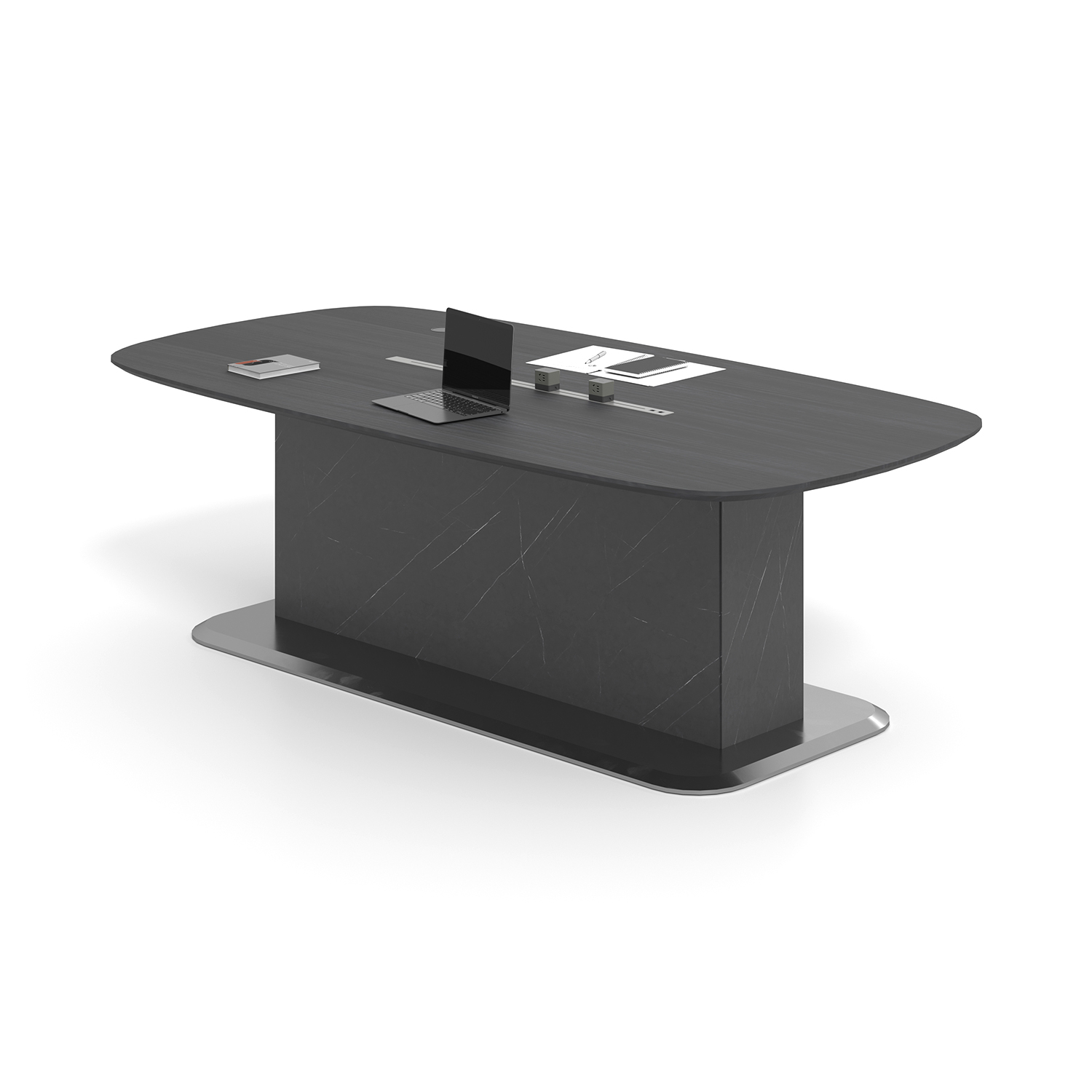
Hori candidate: what the designer still needs | |
Evidence to obtain | Why it changes the room decision |
|---|---|
Exact model and version drawing | Confirms the outline you place on the measured plan; a family name is not enough. |
Base dimensions and usable under-table space | Shows where supports may interfere with knees, chair placement or access. |
Chosen chair dimensions and an occupied trial | Tests reach, entry, standing and movement with the actual table. |
Documentation for any selected power option | Lets the qualified reviewer check that option and its connection route; the photo does not establish a rating. |
The Canadian Centre for Occupational Health and Safety (CCOHS) recommends involving staff in a trial before the final furniture decision. Apply that principle to a short meeting with the intended furniture and AV setup, where a trial is available. A paper footprint can expose an obvious conflict, but cannot verify comfort, camera performance or usable under-table space.
Record the room-plan revision, table version, chair model, AV equipment and meeting task tested.
Record which positions were occupied and which were not tested. Do not turn a partial trial into approval of every seat.
List each conflict with its location, the proposed correction and a named reviewer. Keep design, IT and administration decisions distinct.
Repeat affected checks after a change. Retain the plan and test record with the purchase brief; leave unresolved issues open.
Questions that come up during layout review
What if the whiteboard and display are on different walls?Mark them as separate focal points and test each from the seats that will be used. Include the presenter in the check, since their position changes when they move between walls. Do not approve the arrangement from a test of the display alone. Who should decide when a layout test exposes a problem?Assign the issue to the reviewer responsible for it: the designer for furniture placement, IT for the AV setup, and the facilities/project team for access and applicable requirements. Record the proposed change on the shared plan. Recheck any affected seats before closing the issue. What can the team do before a full furniture trial is available?Create the measured plan, label fixed features and test proposed views using the existing setup where possible. Record which furniture dimensions or equipment conditions differ from the planned purchase. Keep those items unverified until the exact documents or trial are available; do not label the provisional plan approved. |
Take a checked room brief to the supplier
Bring the meeting task, measured room plan, door and AV positions, and seat-check record into the same review. Keep unresolved constraints visible before ordering. If Hori remains on your shortlist, use SpaceUnited's contact page for your configuration inquiry.
Confirm the exact configuration. Request the version drawing and base details needed for your room review, and keep the purchase decision open until the checks are complete.


Conference Table Dimensions: Seating for 6, 8, 10 & 12
Choose a conference table from the seating layout, not the headcount printed beside it. Six, eight, ten or twelve places depend on chair width, space along the edge, usable end positions and the supports below the top.For designers and office buyers, conference table dimensions are a starting point
/ Read More
Large Conference Tables: What Shape Should You Choose
The shape of large conference tables affects how people talk in meetings. A good design helps more people join in and ensures everyone can speak. People see that round or oval large conference tables help everyone take part, but rectangular tables make things more organized and less lively.
/ Read More
What Materials Make the Best Boardroom Conference Tables
Selecting the right material for a boardroom conference table shapes the workspace’s image and performance. Top choices include solid wood, veneer, laminate, metal, glass, and innovative materials. Companies value durability and style most when choosing table materials, as shown below:FactorImportan
/ Read More
Office conference table buying guide with real numbers
Choosing the right office conference table starts with measuring the room. You need to plan for easy movement around the table. A 10-foot table can seat 8 to 10 people. A 12-foot table can fit up to 12 people. Check the table below for a quick guide:Table Length (Feet)Seating Capacity64 – 686 – 8108
/ Read More
How to Find the Perfect Conference Table for Your Meeting Room
The perfect conference table fits the room. It meets every need. It shows a professional environment. Many groups have problems picking a conference table. Some problems are space, shape, and comfort.
/ Read More
Modern Conference Room: Where Precision Meets Collaboration
Modern Agile Office Space: Redefine How We Work, Create, and Collaborate
/ Read More